

“Stop the traffic slide. Diagnose and fix duplicate content issues on medical sites to recover your rankings and patient trust.”
You check your clinic’s website traffic. You expect to see steady growth. Instead, the numbers show a sharp decline. Patient inquiries slow down. Phone calls stop coming in. You wonder what went wrong. You publish new pages. You share health tips. You even expanded into three new cities.
Despite your hard work, your visibility shrinks. The diagnosis? You likely face duplicate content issues that medical sites encounter every day.
Search engines crave original information. They want to provide users with the best, most unique answers. When you present them with pages that look exactly alike, they get confused. They do not know which page to rank. Consequently, they often choose to rank none of them. This leads directly to search ranking drops.
In the healthcare industry, this problem happens frequently. Clinics expand to new locations. They copy and paste their service descriptions. Doctors buy pre-written articles to save time. Marketing teams build complex websites without properly organizing the pages. All these actions create identical pages.
This massive guide will help you understand this problem. We will explain how to find these issues. We will show you how to fix your site architecture. Furthermore, we will walk you through the proper use of canonical tags that healthcare professionals need to know. We will also discuss how to write unique medical copy that search engines love.
By the end of this guide, you will possess the knowledge to perform a thorough medical website audit. More importantly, you will learn how the experts at InvigoMedia can protect your practice from severe search ranking drops.
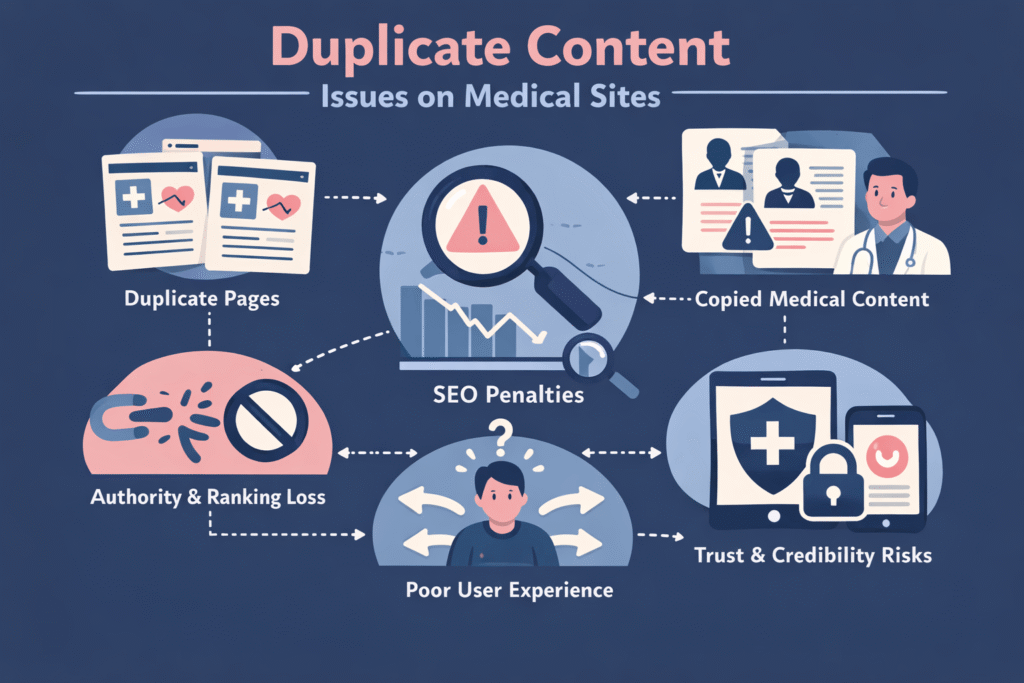
What Exactly Is Duplicate Content?
Duplicate content refers to large blocks of text that appear on multiple web pages. These pages can exist on your own website. They can also exist across different websites.
Search engines like Google index billions of pages. They aim to show distinct results to their users. When they crawl the internet, they compare the text on every page. If they find the same text on two different URLs, they label it as duplicate content.
This issue falls into two main categories: exact matches and near matches.
Exact Match Content
Exact matches happen when two pages share the same source code and text. You might accidentally create this by printing your website on two different URLs. For example, your site might load on both the “www” and “non-www” versions. If you do not redirect one to the other, search engines see two identical websites.
Near Match Content
Near matches happen when the text is mostly the same, with only minor changes. You see this often on medical websites. A dentist might have ten different pages for ten different cities. The text on each page remains identical—only the city name changes. Search engines consider this duplicate content. They also view it as thin content that medical sites use to manipulate search results.
The Danger: Search Ranking Drops and Penalties
Many clinic owners worry about a specific “duplicate content penalty.” Google states that it does not have a formal penalty for duplicate pages. However, the algorithmic impact feels exactly like a penalty.
When search engines find multiple identical pages, they face a choice. They must decide which version to show in the search results. They rarely show multiple versions. Therefore, they pick one page and ignore the rest.
Why Search Engines Hate Duplication
Search engines want to offer a good user experience. Showing ten identical articles about “knee surgery recovery” frustrates users. Therefore, the search engine filters out the duplicates.
If your website contains mostly copied text, search engines lose trust in your domain. They view your site as low-quality. Consequently, they crawl your site less often. They index fewer of your pages. Your overall authority drops. This directly causes massive drops in search rankings across all your keywords.
Content Cannibalization
Sometimes, you create the problem yourself. You publish three different articles about “dental implants.” They all target the same keyword. They cover the same information.
This creates content cannibalization. Your own pages fight each other for the top spot. Because they split the authority, none of them ranks well. Instead of having one strong page on page one, you have three weak pages on page four. A proper medical website audit identifies these internal conflicts immediately.
Common Causes of Duplicate Content Issues on Medical Sites
Healthcare websites fall into specific traps. Clinic owners do not intend to break the rules. They simply try to scale their marketing quickly. Let us examine the most common reasons these issues occur.
Multi-Location Clinic Expansion
Scaling a medical practice requires creating location pages. You open a new clinic in Seattle. You open another in Portland. You need a page for each clinic.
Many marketing agencies take shortcuts here. They write one great page about “Pediatric Care.” Then, they duplicate that page ten times. They change “Seattle” to “Portland” on the second page. They change it to “Tacoma” on the third page.
Google algorithms easily catch this tactic. They view these pages as doorway pages. They classify them as thin content medical sites that try to push into the index. Because the pages offer no unique value beyond the city name, Google ignores them entirely.
Syndication Medical Content
Doctors are busy. Writing an extensive library about medical conditions takes hundreds of hours. Therefore, many practices buy syndicated content. They purchase a subscription from a medical association. The association provides them with 500 articles about different diseases, treatments, and symptoms.
The practice uploads these articles directly to their website. They think they just added massive value to their site.
Unfortunately, they just created a massive SEO problem. Thousands of other clinics bought the same subscription. Thousands of other websites published the same 500 articles. Google sees this syndication of medical content as pure duplication.
Google knows your clinic did not write the original article. It knows the source. Therefore, Google gives all the ranking power to the source. Your clinic gets zero traffic from those 500 pages. Worse, having 500 duplicate pages drags down your entire website’s quality score.
Session IDs and URL Parameters
Sometimes, the software running your website automatically creates duplicate pages. This often happens with patient portals or complex appointment booking systems.
These systems use URL parameters. A parameter adds extra code to the end of a web address. It tracks user sessions or sorts information.
For example, your main page might be: www.yourclinic.com/services
The booking system might generate this URL for a user: www.yourclinic.com/services?sessionid=12345
To a search engine, these look like two different web pages. However, the content on both pages is identical. If your system generates a new session ID for every single visitor, you might accidentally create thousands of duplicate pages. This undermines your technical SEO foundation in healthcare.
Improper HTTPS Setup
Security is vital for medical sites. You must protect patient data. Therefore, you must use a secure server (HTTPS).
However, many clinics fail to implement this properly. They buy the SSL certificate. They make the site secure. But they forget to redirect the old, insecure site (HTTP) to the new secure site.
As a result, both versions stay live. http://www.yourclinic.com https://www.yourclinic.com
Search engines crawl both. They see identical websites. This splits your ranking power completely in half. It is one of the most common issues found during a medical website audit.
How to Identify Duplicate Content: The Medical Website Audit
You cannot fix a problem you cannot see. To cure your website, you must properly diagnose it. You need a comprehensive medical website audit. This process requires technical tools and careful analysis.
Step 1: Use Professional Crawling Tools
You need software that reads your website exactly as Google does. Professional SEO teams use crawlers like Screaming Frog SEO Spider, Ahrefs, or Semrush.
You enter your domain into the crawler. The software clicks every single link on your site. It records every URL. It downloads every piece of data.
Once the crawl finishes, you look for specific reports. These tools have dedicated tabs for duplicate content. They highlight pages with identical titles. They flag pages with exact match headers. They show you exact percentages of similar text across different URLs.
Step 2: Check Google Search Console
Google gives you a free tool to see how they view your site. You must use Google Search Console.
Log in to your account. Navigate to the “Pages” section under “Indexing.” Here, Google explicitly tells you why it refuses to index certain pages.
Look for these specific errors:
- Duplicate without a user-selected canonical
- Duplicate, Google chose a different canonical than the user
- Crawled – currently not indexed
These reports act as a direct map of your duplicate content issues. If Google lists 200 pages under “Duplicate without user-selected canonical,” you have a massive technical problem to solve.
Step 3: Perform Manual Search Operators
You can use Google itself to find copied text. Take a unique sentence from your website. Copy it. Go to Google. Paste the sentence inside quotation marks.
For example: “At Smith Clinic, our physical therapists use advanced motion tracking to treat joint pain.”
Press search. If Google shows only your website, your content is unique. If Google shows ten different websites with the same sentence, you have a syndication problem. You must rewrite that text immediately.
Step 4: Analyze Site Architecture
During your medical website audit, review how your pages link to one another. Look at your navigation menus. Check your footer links.
Poor site architecture often hides duplication. You might have a “Services” page that lists all your treatments. You might also have a “Treatments” page that lists the same things. You must combine these. Good site architecture dictates that each concept deserves only one specific page.
Technical SEO Healthcare: Fixing the Core Issues
Once you identify the duplicate pages, you must fix them. You have several technical tools at your disposal. You must choose the right tool for the specific problem. Applying the wrong fix can cause even more drops in search ranking.
Proper Use of Canonical Tags in Healthcare
The canonical tag is your most powerful weapon against duplicate content. A canonical tag is a small piece of HTML code. It sits in the head section of your web page.
This tag speaks directly to search engines. It says, “I know several pages look similar to this one. However, this specific URL is the master copy. Please rank this one and ignore the others.”
For example, imagine you run a complex e-commerce store for medical supplies. You sell a knee brace. Users can sort the knee brace page by size or color. This creates multiple URLs:
- www.store.com/knee-brace
- www.store.com/knee-brace?color=blue
- www.store.com/knee-brace?size=large
All three pages show the same product. You want the main page to rank. Therefore, you place a canonical tag on all three pages. The tag points to the main page.
The code looks like this: <link rel=”canonical” href=”https://www.store.com/knee-brace” />
When Google bots read this code, they understand your intention. They combine the ranking signals from all three URLs. They assign all that power to the master URL.
Proper implementation of canonical tags for healthcare sites requires precision. You must ensure the tags point to the correct, live pages. If you point a canonical tag to a broken link, you will ruin your rankings. Furthermore, you must ensure your canonical tags match your XML sitemap. Search engines get confused if your sitemap lists one page, but your canonical tag points to another.
Implementing 301 Redirects
Sometimes, you do not need the duplicate page to exist at all. For example, you might have created two different pages for the same service by accident.
Page A: www.clinic.com/teeth-whitening Page B: www.clinic.com/teeth-whitening-services
You do not want users to visit Page B. You only want one page to exist. In this scenario, you use a 301 redirect.
A 301 redirect is a server-level command. It permanently forwards traffic from one URL to another URL. When a user tries to load Page B, the server redirects them to Page A immediately. They do not even notice the change.
More importantly, a 301 redirect passes the SEO value. If Page B earned any backlinks, the redirect sends that authority to Page A. This eliminates the duplicate content issue and simultaneously strengthens your main page.
Using Noindex Tags
Some pages must exist for users, but you do not want search engines to read them. Patient privacy policies, internal staff portals, or terms of service pages often fall into this category. Sometimes, legal teams require you to post identical disclaimer text across multiple pages.
To stop search engines from penalizing this necessary duplication, you use a “noindex” tag.
This is another piece of HTML code in the head section. It looks like this: <meta name=”robots” content=”noindex”>
This tag gives search engines a strict command. It tells them to drop the page from their index completely. The page remains accessible to humans clicking links on your site. However, it will never appear in Google search results.
Use noindex tags very carefully. If you accidentally place a noindex tag on your homepage, your entire website will disappear from Google. Always double-check your tags during a technical SEO healthcare review.
Fixing URL Structure and Trailing Slashes
Small technical errors cause big duplicate content problems. Look closely at how your web server handles URLs.
Does your site load with a slash at the end, and without a slash? www.clinic.com/about www.clinic.com/about/
Search engines treat these as two separate pages. Your technical SEO healthcare strategy must force the server to choose one version. You must apply a site-wide redirect rule. This rule should force all traffic to either the slashed version or the unslashed version.
The same rule applies to capital letters. www.clinic.com/About www.clinic.com/about
These are technically two different URLs. Force your server to load everything in lowercase. This prevents accidental duplication when other websites link to you using the wrong capitalization.
Rewriting Service Pages: Creating Unique Medical Copy
Technical fixes handle system errors. However, technical fixes cannot solve lazy marketing. If you copied text for your location pages or bought syndicated content, you must rewrite it. You must generate unique medical copy.
This process requires time and effort. Search engines reward original, helpful, and authoritative information.
Fixing Multi-Location Pages
Let us return to the multi-location clinic problem. You have ten pages for ten cities. The text is identical. You must break this pattern.
Do not just swap out the city name. You need to build a unique experience for each location. Here is how you create unique medical copy for franchise locations:
1. Introduce the Local Doctors. Every clinic has different staff. Feature the specific doctors working at that location. Add their headshots. Write a unique biography for each physician. Detail their specific medical background. This instantly adds hundreds of unique words to the page.
2. Describe the Specific Facility. Every building looks different. Describe the actual clinic. Do you have a state-of-the-art MRI machine in Seattle, but not in Tacoma? Mention it. Describe the parking situation. Talk about the waiting room amenities. Explain how to find the building using local landmarks. “We are located just past the big red coffee shop on 5th Avenue.”
3. Use Local Patient Testimonials: Gather reviews from patients who actually visited that specific location. Put a review from a Seattle patient on the Seattle page. Put a review from a Tacoma patient on the Tacoma page. Real reviews provide completely original text that search engines love.
4. Discuss Local Health Trends: Tie your medical services to the local environment. If you run an allergy clinic in Austin, talk about “Cedar Fever,” a specific local allergy. If you run a physical therapy clinic in a ski town, talk about common skiing injuries. This makes your content highly relevant and completely original.
By following these four steps, you transform thin medical content pages into robust, high-ranking local assets.
Managing Syndication Medical Content
If you purchased a library of 500 medical articles, you have a major decision to make. You cannot leave them as they are.
Option A: Noindex the Library. If you want the articles to educate patients who are already on your site, use the noindex tag. Add the noindex tag to all 500 articles. This stops Google from reading them. It instantly cures your duplicate content problem. Your site health will improve. However, you will never get search traffic from those 500 pages.
Option B: Rewrite the Most Important Pages. Identify the top 20 treatments your clinic actually provides. Take those 20 syndicated articles and rewrite them entirely.
Do not just use an automated spinner tool. Search engines catch AI-spun content easily. You must write original text.
Read the syndicated article. Close it. Then, write about the topic using your clinic’s specific voice. Add your doctor’s personal opinions on the treatment. Describe your specific clinical approach. Outline the exact step-by-step process a patient experiences when they walk through your doors for that treatment.
Once you write the original version, delete the syndicated version. Apply a 301 redirect from the old URL to your new, unique medical copy.
Leave the other 480 less important articles on “noindex.” This strategy focuses your energy on the pages that actually generate revenue.
The Importance of E-E-A-T in Healthcare
When writing unique medical copy, you must remember Google’s quality guidelines. Google uses E-E-A-T. This stands for Experience, Expertise, Authoritativeness, and Trustworthiness.
Healthcare falls under a special category called “Your Money or Your Life” (YMYL). Google holds medical sites to the highest possible standards. If your content is duplicate, thin, or inaccurate, Google will suppress it.
To prove your expertise, real doctors must review your content. Add author bylines to your articles. Include links to the doctor’s medical credentials. Cite real scientific studies when making health claims. Original content written by actual medical professionals always outperforms copied, generic text.
Site Architecture: Organizing Your Medical Knowledge
Sometimes, duplicate content happens because your website is a mess. If you have no clear structure, pages bleed into each other. You end up repeating the same information across multiple pages because you do not know where it belongs.
You must clean up your site architecture. This is a massive part of technical SEO for healthcare.
Create Logical Content Silos
A content silo organizes your website by distinct topics. Imagine a filing cabinet. You do not throw all your papers into one drawer. You create folders.
Your website needs folders.
For example, a dental website should have a silo for “Cosmetic Dentistry.” Under this main category, you place specific pages:
- Teeth Whitening
- Veneers
- Invisalign
You create another silo for “Restorative Dentistry.” Under this category, you place:
- Implants
- Crowns
- Bridges
Never mix the topics. Do not write about teeth whitening on the implants page. Do not write about crowns on the veneers page. Keep every page laser-focused on one single topic. This eliminates content cannibalization. It ensures every page serves a unique, specific purpose.
Master Internal Linking
How you link your pages together tells search engines how to understand your site.
Use exact match anchor text to point to your main pages. If you write a blog post about “how to prepare for implant surgery,” you should link the words “dental implants” back to your main Dental Implants service page.
Do this consistently. Do not link the words “dental implants” to your contact page. Do not link it to your homepage. Always point internal links to the most relevant, unique page for that specific topic. This reinforces your site architecture. It tells Google exactly which page acts as the master copy for that subject.
Google Penalty Recovery: Steps to Regain Trust
If you suffered significant drops in search rankings due to duplicate content, you need a recovery plan. Fixing the technical errors is only the first step. You must actively push Google to re-evaluate your website.
Step 1: Execute the Purge
You must aggressively clean the site. Implement your 301 redirects. Apply your canonical tags to healthcare parameters. Add your noindex tags to thin content. Delete useless pages entirely. Do not leave any trace of the copied text.
Step 2: Update Your XML Sitemap
Your XML sitemap acts as a map for search engine bots. After you delete pages or add redirects, your old sitemap becomes inaccurate.
You must generate a brand new XML sitemap. Ensure this new sitemap only contains your live, original, high-quality pages. Do not include any URLs that have a noindex tag. Do not include any URLs that redirect somewhere else. Make the map perfectly clean.
Step 3: Resubmit via Search Console
Log back into Google Search Console. Navigate to the “Sitemaps” section. Submit your newly generated XML sitemap.
Next, use the “URL Inspection” tool. Type in the URLs of your newly rewritten, unique service pages. Click the button that says “Request Indexing.” This actively pings Google. It asks their bots to return and review your improvements right away.
Step 4: Build External Authority
Google penalty recovery takes time. You lost trust. You must earn it back.
Once your site is technically sound and full of unique medical copy, you need backlinks. You need other reputable websites to link to your clinic.
Reach out to local business directories. Ensure your clinic’s name, address, and phone number are perfectly consistent across the web. Write guest articles for respected medical journals. Sponsor local health events and ask for a link from the event website.
High-quality backlinks act as votes of confidence. When Google sees trusted websites linking to your newly cleaned pages, they restore your rankings much faster.
Why Partner with InvigoMedia?
Fixing duplicate content requires deep technical knowledge. One wrong redirect can break your entire website. Improper use of canonical tags that healthcare sites rely on can destroy years of SEO progress. You cannot afford to guess when it comes to medical marketing.
You need experts who understand the unique challenges of the healthcare industry. You need InvigoMedia.
InvigoMedia specializes in medical website audits. They do not just look at surface-level problems. They dive deep into your server logs. They analyze your URL structures. They identify hidden session ID duplications that standard tools miss.
When you face a drop in search rankings, the team at InvigoMedia acts fast. They execute comprehensive technical SEO strategies for healthcare. They map out complex site architecture redesigns. They manage massive 301 redirect lists flawlessly.
Furthermore, InvigoMedia understands the necessity of unique medical copy. They know how to restructure multi-location clinic pages to dominate local search results. They know how to handle syndicated patient education libraries safely. They protect your brand from algorithmic suppression.
Stop losing patients to competitors with better-optimized websites. Stop letting technical errors drain your marketing budget. Contact InvigoMedia today. Let their technical SEO experts audit your website, clear your duplicate content, and drive your medical practice back to the top of the search results.
Frequently Asked Questions (FAQs)
1. How long does Google penalty recovery take after fixing duplicate content?
Recovery timelines vary significantly. If you simply had a few overlapping tags, you might see improvements in a few weeks. However, if your entire site consisted solely of copied, syndicated text, recovery would take months. Google must re-crawl your entire domain. It must process your redirects. Most importantly, it must evaluate your new, unique medical copy. Expect to wait 3 to 6 months for substantial traffic to return after a major cleanup.
2. Can I use the same medical disclaimer on every page of my website?
Yes. Search engines understand that medical, legal, and financial websites require boilerplate text. Placing the same legal disclaimer in the footer of every page will not cause the duplicate content issues that medical sites fear. Google’s algorithm ignores boilerplate text when evaluating a page’s unique value.
3. What is the difference between a 301 redirect and a canonical tag?
A 301 redirect physically moves users and bots from one page to another. The old page becomes inaccessible. Use a 301 redirect when you want to delete a duplicate page permanently. A canonical tag leaves both pages live and accessible to users. It just tells the search engine which version to rank. Use a canonical tag when you need multiple versions for user experience but only want one in search results.
4. Why is my patient portal creating thin content medical pages?
Patient portals often generate dynamic URLs based on user clicks, session IDs, or search parameters. Every time a patient searches for a doctor within the portal, the system creates a new URL. Because the template text remains the same, Google reads thousands of identical pages. You must block search engines from crawling your patient portal by using a robots.txt file or implementing site-wide noindex tags on the portal subdomain.
5. How much unique text do I need on a multi-location clinic page?
You should rewrite at least 60% of the text on your local service pages. Changing just the city name and phone number is not enough. You must add unique paragraphs about the local staff, the specific facility, local patient reviews, and localized health information. The more original text you provide, the faster you secure high local rankings.
6. Will buying syndicated medical content hurt my site?
It will hurt your SEO if you publish it exactly as it is without protection. If you paste hundreds of purchased articles onto your site, Google will ignore them. If they make up the majority of your website, your overall domain authority will crash. You must either rewrite them completely to create unique medical copy or use noindex tags to keep them hidden from search engines while remaining useful to your patients.
7. How often should I perform a medical website audit?
You should perform a comprehensive medical website audit at least twice a year. However, if you actively publish content weekly or continually add new clinic locations, you should run a technical crawl every month. Catching duplicate tags or broken redirects early prevents massive drops in search rankings.
8. What is content cannibalization, and how do I fix it?
Content cannibalization happens when multiple pages on your own website target the same keyword with similar information. Google does not know which page to rank, so it ranks none of them. To fix it, you must audit your site architecture. Choose the strongest page as the master copy. Combine the useful information from the weaker pages into the master copy. Finally, set up 301 redirects from the weaker pages to the master page.
9. Do canonical tags pass link equity as 301 redirects do?
Yes, canonical tags generally pass link equity (ranking power) to the master URL, similar to a 301 redirect. If a duplicate page has backlinks pointing to it, adding a canonical tag tells Google to credit those backlinks to the main page instead. However, a 301 redirect is considered a stronger, more permanent signal.
10. How can InvigoMedia help with technical SEO healthcare problems?
InvigoMedia provides specialized expertise for medical practices. They utilize advanced crawling tools to uncover hidden duplicate content. They correctly implement complex server-level redirects and the canonical tags required by healthcare sites. They also provide strategic direction for creating unique, compliant medical copy. By managing your entire site architecture, they protect your domain from algorithmic penalties and ensure your clinic ranks highly for the services you provide.