

“Protect your practice from legal risks. Learn how ADA compliance for medical websites ensures accessibility and prevents lawsuits.”
The Americans with Disabilities Act (ADA) was passed in 1990. At that time, lawmakers focused on physical spaces. They mandated wheelchair ramps, accessible restrooms, and braille signage. Fast forward to today, and the internet serves as our primary place of public accommodation.
Therefore, courts across the United States have consistently ruled that the ADA applies to websites. If a business operates a physical location and a website, that website must remain accessible to users with disabilities. Healthcare providers face even stricter scrutiny. Patients rely on your site for critical health information, test results, and appointment scheduling.
The Surge of ADA Demand Letters
Small medical practices fly under the radar. You are wrong. Law firms actively hunt for non-compliant websites. They use automated software to scan thousands of medical websites a day. When they find missing alt text or poor contrast, they send a demand letter.
These letters threaten immediate legal action unless you pay a hefty settlement. Consequently, ADA lawsuit prevention must become your top digital priority. Fighting these lawsuits costs tens of thousands of dollars in legal fees. Settling the lawsuit often costs just as much. In addition, you still have to pay a web developer to fix the website afterward.
You must act proactively. Waiting for a demand letter is a dangerous and expensive strategy.
What Does ADA Compliance for Medical Websites Actually Mean?
ADA compliance means building your website so people with disabilities can use it effectively. This includes individuals with visual, auditory, motor, and cognitive impairments.
To achieve this, developers follow a specific set of rules. The international standard is the Web Content Accessibility Guidelines (WCAG). Currently, the legal benchmark for compliance is WCAG 2.1 Level AA. If your website meets these criteria, you significantly reduce your legal risk.
Understanding the Four Pillars of Accessibility
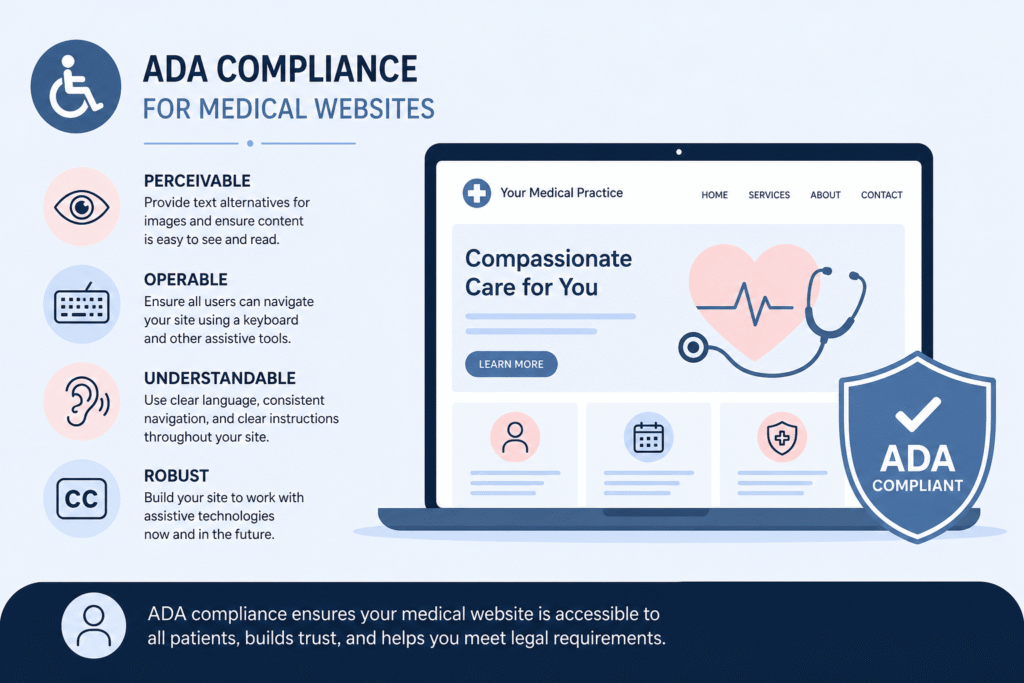
The WCAG guidelines for healthcare websites must follow four main principles. Experts use the acronym POUR to describe them. Your website must be:
- Perceivable: Users must be able to perceive the information presented. For example, if a user cannot see, your site must provide a way for them to hear the content.
- Operable: Users must be able to operate the interface. If a user cannot use a mouse, they must be able to navigate your site using only a keyboard.
- Understandable: Users must be able to understand the information and the user interface’s operation. Your text must remain clear and easy to read.
- Robust: Content must remain robust enough that a wide variety of user agents, including assistive technologies, can interpret it. As browsers update, your site must not break.
Essential Features for Accessible Medical Web Design
To truly understand inclusive design in healthcare, we must examine the specific features that make a website accessible. You cannot just guess what works. You must implement proven technical solutions. Let us break down the most critical elements you need.
Medical Site Screen Readers and Compatibility
Many patients with severe visual impairments use screen readers. These software programs read text on a screen aloud. Popular screen readers include JAWS, NVDA, and VoiceOver.
If a web developer builds a site poorly, screen readers cannot understand it. For instance, developers must use proper heading structures (H1, H2, H3). This allows screen reader users to jump from section to section. If you simply make text bold and large without using actual heading tags, the screen reader users get lost. They have to read every single word on the page to find what they need.
Furthermore, you must label all form fields correctly. When a patient tries to request an appointment, the screen reader must announce exactly what each box requires. If a box just says “edit,” the patient will not know whether to type their name, their phone number, or their medical issue.
Perfecting Alt Text for Medical Images
Visual elements dominate modern web design. However, blind users cannot see your photos, charts, or infographics. Therefore, you must use alternative text, commonly known as alt text.
Alt text for medical images requires careful attention. You provide a written description of the image within the website’s code. The screen reader reads this description out loud.
Imagine you publish an article about skin cancer. You include a photo comparing a normal mole to a melanoma. If the alt text just says “image123.jpg”, a blind user misses crucial medical information. Instead, the alt text should say: “Close-up comparison showing a symmetrical, uniform normal mole next to a melanoma with irregular borders and uneven color.”
Similarly, you must add alt text to photos of your doctors. Instead of “Dr. Smith,” write “Dr. John Smith, Chief Cardiologist, smiling in a white lab coat.” This provides context and builds trust. Conversely, if an image is purely decorative, like a background pattern, you must use an empty alt attribute. This tells the screen reader to skip it entirely.
Color Contrast and Visual Clarity
Millions of people suffer from color blindness or low vision. They struggle to read text that blends into the background. Therefore, the WCAG guidelines mandate specific color contrast ratios.
For normal text, the contrast ratio between the text and the background must remain at least 4.5:1. For large text, the ratio drops slightly to 3.0:1.
Many medical websites love using soft, calming colors. They use light blue text on a white background or white text on a light gray background. Unfortunately, these combinations often fail accessibility standards. Users simply cannot read the words.
You must test your brand colors. If they fail the contrast test, you must darken the text or lighten the background. Additionally, you must never use color alone to convey meaning. For example, do not say “Click the red button for emergencies.” A colorblind user might not know which button is red. You must also include clear text labels, such as “Emergency Contact.”
Keyboard Navigation and Motor Disabilities
Not everyone can use a mouse or a trackpad. Some patients have Parkinson’s disease, severe arthritis, or paralysis. These individuals rely entirely on a keyboard to browse the web. They use the “Tab” key to navigate links and buttons. They use “Shift + Tab” to move backward. They use “Enter” to click.
An accessible medical web design fully supports keyboard navigation. You must ensure users can access every link, menu, and form field using only a keyboard.
Furthermore, users must see a visible “focus indicator.” When they tab to a button, that button must change appearance. Usually, a prominent outline appears around the element. If you remove this outline for aesthetic reasons, keyboard users will completely lose track of their position on the page. They will abandon your site immediately.
Transcripts and Captions for Video Content
Medical practices increasingly use video to educate patients. You might post a video explaining a surgical procedure or welcoming new patients to the clinic.
However, deaf and hard-of-hearing patients cannot hear these videos. Therefore, you must provide closed captions for all pre-recorded video content. Captions display the spoken words on the screen. They also describe important background sounds, like an alarm ringing or a machine beeping.
In addition to captions, you should provide a full text transcript below the video. This allows users to read the content at their own pace. It also provides a massive boost to your search engine optimization (SEO), as search engines can crawl the text.
How Cognitive Disabilities Impact Patient User Experience
When we discuss ADA compliance for medical websites, we often focus on physical and sensory disabilities. However, cognitive disabilities require equal attention. These include conditions like dyslexia, ADHD, autism, and age-related cognitive decline.
Creating a positive patient user experience means reducing cognitive load. You must make your website simple, predictable, and easy to understand.
Clear and Simple Language
Healthcare websites often fall into the trap of using dense medical jargon. Doctors understand these terms, but the average patient does not. For a user with a cognitive disability, complex medical terminology acts as a massive barrier.
You must write your content in plain English. Use short paragraphs. Use bulleted lists to break up large blocks of text. Define complex terms immediately when you use them. This approach does not dumb down your content. Instead, it ensures clarity and precision for everyone.
Consistent Navigation
Predictability helps users feel comfortable. You must keep your website’s navigation menus consistent across every single page. The “Contact Us” link should always appear in the same spot. The search bar should never move.
If a user learns how to navigate your home page, they should instantly know how to navigate your services pages. Confusing layouts create anxiety and cause users to leave.
Pausing Animations and Managing Form Timeouts
Moving elements distract users. If you have auto-playing videos, rotating carousels, or flashing graphics, you must give users a way to pause or stop them. For some users, flashing graphics can even trigger seizures. You must never include content that flashes more than three times per second.
Additionally, consider how you handle online forms. Many healthcare portals log users out after a few minutes of inactivity to protect privacy. However, a patient with a cognitive or motor disability might need twenty minutes to type out their medical history. If your form times out and deletes their work without warning, you create a terrible patient user experience.
You must warn users before a timeout occurs. Give them a simple way to extend their session with a single click or keystroke.
The Intersection of HIPAA, Patient Portals, and Accessibility
Healthcare providers face a unique challenge. You must balance the strict privacy rules with the accessibility requirements of the ADA.
Patients frequently use online portals to view lab results, message their doctors, and pay bills. These portals must maintain absolute security. Simultaneously, they must remain fully accessible.
If a blind patient cannot read their own biopsy results because the patient portal lacks screen reader compatibility, you violate their rights. They are forced to share their private login credentials with a sighted family member. This forces them to give up their medical privacy simply because your software fails to meet WCAG guidelines.
You must demand accessibility from your third-party software vendors. When you choose an electronic health record (EHR) system or a patient portal, you must request the Voluntary Product Accessibility Template (VPAT) for that system or portal. This document explains how well their product meets accessibility standards. If their product fails, you must find a different vendor. Ultimately, the legal liability rests on your practice.
Section 508 Compliance vs. ADA Compliance
You will often hear the terms ADA and Section 508 used together. While they share the same goal, they apply to different entities.
The ADA is a broad civil rights law. It applies to state and local governments, as well as private businesses open to the public. Medical practices fall under Title III of the ADA.
Section 508, on the other hand, is a specific section of the Rehabilitation Act of 1973. It requires federal agencies to make their electronic and information technology accessible to people with disabilities.
Why does Section 508 matter for private medical practices? It matters because of funding. If your hospital or clinic receives federal funding, such as Medicare or Medicaid payments, you fall under Section 504 of the Rehabilitation Act. The Department of Health and Human Services (HHS) frequently uses Section 508 standards to evaluate compliance for organizations receiving federal funds.
Therefore, Section 508 compliance mirrors ADA compliance in the digital space. Both point directly to the WCAG guidelines. If you meet WCAG 2.1 AA standards, you satisfy both the ADA and the Rehabilitation Act.
How to Conduct a Thorough Website Accessibility Audit
You cannot fix what you do not know is broken. To begin your journey toward compliance, you must conduct a comprehensive website accessibility audit. This process identifies exactly where your website fails to meet the standards.
Do not rely on guesswork. You must follow a structured, professional approach.
Step 1: Automated Scanning Tools
The audit process always begins with automated software. Tools like WAVE, Axe, or Lighthouse crawl your website’s code. They instantly flag obvious errors.
Automated scanners excel at finding missing alt text, incorrect heading structures, and severe color contrast failures. They can scan hundreds of pages in minutes. Consequently, they provide a fast and cost-effective starting point.
However, automated tools have severe limitations. They can only catch about 30% of accessibility errors. For example, a scanner can tell you if an image has alt text. It cannot tell you if the alt text makes any sense. If a photo of a broken bone has the alt text “dog playing in park,” the automated scanner passes it. A human must evaluate the context.
Step 2: Manual Code Inspection and Testing
Because automated tools fall short, you must perform manual testing. A skilled web developer must inspect your website’s code and interface.
During manual testing, the developer unplugs their mouse. They navigate the entire website using only a keyboard. They check for visible focus indicators. They ensure there are no keyboard traps, where a user gets stuck in a specific section and cannot tab out.
The developer also zooms in the browser to 200% and 400%. They check if the text overlaps or disappears. They ensure the site remains fully functional on small mobile screens. They verify that form error messages are descriptive and helpful.
Step 3: Screen Reader Testing
Next, the auditor must test the site using actual assistive technology. They activate screen readers like NVDA or VoiceOver. They close their eyes and try to complete core tasks.
They will attempt to book an appointment, find a doctor’s bio, and read a blog post. This step reveals the true user experience for a blind patient. If the screen reader mispronounces vital information or gets stuck on hidden menus, the developer logs the error for remediation.
Step 4: Remediation and Reporting
After completing the manual and automated tests, the auditor compiles a massive report. This document lists every single WCAG violation found on your site. It grades each issue by severity.
Most importantly, a proper audit provides specific, actionable instructions for fixing the code. Your development team then takes this report and systematically repairs the website.
ADA Lawsuit Prevention: Actionable Steps for Your Practice
Achieving ADA compliance for medical websites is not a one-time project. It requires ongoing maintenance. Websites constantly change. You add new blog posts, update doctor profiles, and install new plugins. Every update introduces the risk of new accessibility barriers.
To prevent ADA lawsuits, you must integrate accessibility into your daily operations. Implement these best practices immediately.
Publish an Accessibility Statement
You should publish a formal Accessibility Statement on your website. Place the link in the footer so it appears on every page.
This statement publicly declares your commitment to digital inclusion. It should mention the specific WCAG standards you strive to meet. Furthermore, it must provide a direct contact method. Tell users exactly who to contact if they encounter a barrier on your site.
If a frustrated user can easily contact your office for help, they are much less likely to call a lawyer. An accessibility statement shows good faith and acts as a powerful deterrent to predatory litigation.
Train Your Content Creators
Your web developer can build a perfectly accessible template. However, your marketing team can ruin it the very next day. If a staff member uploads an image without alt text or publishes a video without captions, your site becomes non-compliant again.
You must train everyone who touches your website. Teach them the basics of WCAG guidelines healthcare marketers need to know. Create a strict checklist for publishing new content. Require descriptive alt text, proper headings, and accessible PDFs.
Schedule Regular Re-Audits
Do not let your site degrade over time. You must schedule regular accessibility audits. Depending on how frequently you update your content, you should run automated scans monthly. You should commission a full manual audit at least once a year.
Think of it like a routine medical checkup for your website. Catching small problems early prevents massive legal headaches down the road.
Avoid “Overlay” Widgets
You might see advertisements for cheap accessibility widgets or “overlays.” These companies claim you can just install one line of code, and an automated toolbar will instantly fix your entire site. They promise immediate ADA compliance for $50 a month.
Do not fall for this trap. Overlays do not work. They act as a superficial bandage over broken code. They cannot fix complex issues such as keyboard traps or poorly labeled forms. In fact, many disabled users hate these widgets. The overlays often interfere with their native screen readers, making the site even harder to use.
Worse yet, lawsuits specifically target websites that use these widgets. Plaintiff lawyers know that if you use an overlay, your underlying code is likely broken. Using a quick-fix widget paints a massive target on your back. You must fix the actual source code of your website.
Why Inclusive Design Healthcare Benefits Everyone
We often view ADA compliance purely through the lens of legal risk mitigation. However, making your site accessible offers significant benefits to your entire patient base. Inclusive design healthcare principles improve the web for everyone.
Serving the Aging Population
Consider the demographics of healthcare. Older adults utilize medical services more frequently than any other age group. As people age, they naturally experience changes in their vision, hearing, and motor skills.
An older patient might not consider themselves “disabled.” They simply find small text hard to read. They might have a slight hand tremor that makes clicking tiny links difficult. By implementing strong color contrast, large legible fonts, and generous clickable areas, you drastically improve the experience for senior citizens.
Assisting with Temporary Disabilities
Accessibility also helps people with temporary impairments. Imagine a patient who just broke their right arm. They cannot use their mouse. For the next six weeks, they must navigate the web using only their left hand on a keyboard. Because you implemented proper keyboard navigation, this patient can still easily access their medical records and book follow-up appointments.
Designing for Situational Limitations
Even fully non-disabled individuals benefit from accessible design in certain situations. Suppose a mother is watching a pediatrician’s instructional video on her phone while holding a sleeping baby. She cannot turn on the sound. Because you provided accurate closed captions, she can still consume the content silently.
Or imagine a patient trying to find your clinic’s address on their phone while standing outside in glaring sunlight. Because you ensured high color contrast, they can easily read the map on their screen despite the glare.
Good accessibility is simply good design. It removes friction. It builds trust. It ensures that whenever a patient needs you, regardless of their circumstances, your digital front door remains wide open.
SEO Benefits of Accessible Medical Web Design
Did you know that search engines like Google essentially browse the internet like blind users? Google’s web crawlers cannot see images. They cannot watch videos. They cannot use a mouse. They rely entirely on text, code structure, and semantic markup to understand a website.
Therefore, when you optimize your site for accessibility, you also optimize it for search engines. This creates a powerful return on investment.
When you add descriptive alt text for medical images, you give Google more context about your content. Your images might start ranking in Google Image Search. When you provide transcripts for your videos, Google indexes all those valuable keywords. When you use proper heading tags, Google can easily understand the hierarchy and main topics of your page.
Furthermore, Google actively monitors user experience metrics. If users frequently abandon your site because it is difficult to navigate, Google notices. Your rankings will drop. Conversely, a clean, accessible site keeps users engaged longer. This signals to Google that your site provides high-quality information, boosting your overall search visibility.
ADA compliance for medical websites is not just a legal shield. It is a powerful marketing tool that drives new patient acquisition.
Partner with InvigoMedia for Flawless Medical Web Design
Achieving true ADA compliance requires deep technical expertise. You cannot assign this task to an amateur. You need a dedicated partner who understands both the complexities of web development and the strict regulations of the healthcare industry.
InvigoMedia stands as the premier agency for accessible medical web design. We do not just build visually stunning websites; we engineer digital experiences that serve every single patient while fiercely protecting your practice from legal threats.
Why Ordinary Agencies Fail
Most standard marketing agencies lack the specialized knowledge required for healthcare compliance. They prioritize flashy aesthetics over functional accessibility. They rely heavily on pre-built templates that contain hundreds of hidden WCAG violations. They deliver a website that looks great to a sighted user but functions as a digital brick wall for someone using a screen reader.
Furthermore, generalist agencies do not understand HIPAA or patient portal integrations. They leave glaring vulnerabilities in your digital infrastructure.
The InvigoMedia Advantage
InvigoMedia takes a radically different approach. We specialize exclusively in healthcare marketing and web development. We build accessibility into the foundation of your website from day one.
When you partner with InvigoMedia, you receive:
- Expert WCAG Implementation: Our developers write clean, semantic code that meets WCAG 2.1 Level AA standards.
- Comprehensive Auditing: We run rigorous automated and manual tests throughout the build process. We guarantee zero keyboard traps and complete screen reader compatibility.
- Custom Inclusive Design: Our designers create beautiful, modern interfaces that never compromise on color contrast or readability. We prove that accessible sites can still look incredible.
- Ongoing Protection: We offer continuous monitoring and maintenance packages. As browsers update and standards evolve, we keep your site fully compliant, preventing long-term ADA lawsuits.
- Staff Training: We empower your team. We provide the guidelines and knowledge you need to maintain accessibility when adding new blogs or team members.
Do not gamble with your practice’s reputation or financial security. A non-compliant website is a ticking time bomb. Let InvigoMedia build you a digital presence that reflects the high standard of care you provide in your clinic. Contact InvigoMedia today to schedule your comprehensive website accessibility audit. Protect your practice, serve your community, and welcome every patient through your digital front door.
Frequently Asked Questions (FAQs)
What happens if my medical website is not ADA-compliant?
If your website fails to meet ADA compliance standards, you face significant legal risks. Plaintiff lawyers actively search for non-compliant sites and send demand letters threatening lawsuits. You could face tens of thousands of dollars in legal fees, settlement costs, and mandatory remediation expenses. Furthermore, you actively alienate patients with disabilities, damaging your reputation and losing potential revenue.
Do small private practices really get sued over website accessibility?
Yes. Small medical practices frequently receive demand letters. Automated software enables lawyers to scan thousands of small business websites. They do not only target large hospitals. Any public-facing business remains vulnerable. Proactive compliance is the only reliable defense.
Does using a simple accessibility plugin protect my website?
No. Overlay widgets and quick-fix plugins do not protect you from lawsuits. In fact, they often cause more problems by interfering with native screen reader software. Plaintiff attorneys specifically target websites that use these plugins because they indicate underlying code failures. True compliance requires fixing the actual source code of your website.
How often should I conduct a website accessibility audit?
You should conduct a full manual website accessibility audit at least once a year. Additionally, you should run automated scans monthly or whenever you publish significant new content. Websites are dynamic environments. Regular testing ensures that new updates do not introduce new accessibility barriers.
What are the exact WCAG guidelines healthcare websites need to follow?
The current legal standard for most healthcare websites is the Web Content Accessibility Guidelines (WCAG) version 2.1, Level AA. This standard mandates requirements for screen reader compatibility, keyboard navigability, color contrast ratios, alt text for images, and closed captions for multimedia.
How does ADA compliance affect my patient portal?
Patient portals are subject to the same ADA regulations as your main website. If a patient with a disability cannot access their test results or message their doctor independently, you violate their rights. You must ensure your third-party portal vendors provide fully accessible, WCAG-compliant software.
Can InvigoMedia fix my current website, or do I need a brand new one?
InvigoMedia can evaluate your existing site. Sometimes, a site only requires moderate remediation to achieve compliance. We can fix the code and adjust the design. However, if your current site relies on fundamentally broken templates or outdated platforms, building a new, accessible medical web design from scratch often proves more cost-effective and secure. We provide honest assessments during our initial audit.
Is ADA compliance a one-time project?
No. ADA compliance requires ongoing effort. Every time you add a new staff photo, publish a blog post, or embed a video, you must ensure that the specific element complies with accessibility standards. InvigoMedia provides the initial build and ongoing support to maintain your long-term compliance.
How do screen readers actually work on a medical website?
Screen readers convert text and HTML code into synthesized speech or braille output. They rely on the website’s code structure to navigate. A user can press keys to jump between headings, read alt text descriptions of images, or fill out forms. If the website lacks proper semantic code, the screen reader cannot interpret the page, rendering it useless to the patient.
What is the difference between Section 508 and the ADA?
The ADA is a civil rights law affecting state/local governments and private businesses open to the public, including medical practices. Section 508 is a federal law that applies to federal agencies and organizations that receive federal funding (such as Medicaid/Medicare). Both ultimately require adherence to the WCAG guidelines to ensure digital accessibility.