
“Choosing the right platform is critical. Compare WordPress vs. custom medical design to find the best balance of security, SEO, and growth.”
The modern patient journey begins online. Today, a digital storefront serves as the primary touchpoint between a healthcare provider and a prospective patient. People search for symptoms, read reviews, and seek out specialized treatments long before they ever pick up a phone to schedule an appointment. Therefore, medical practices must present a professional, fast, and secure digital presence.
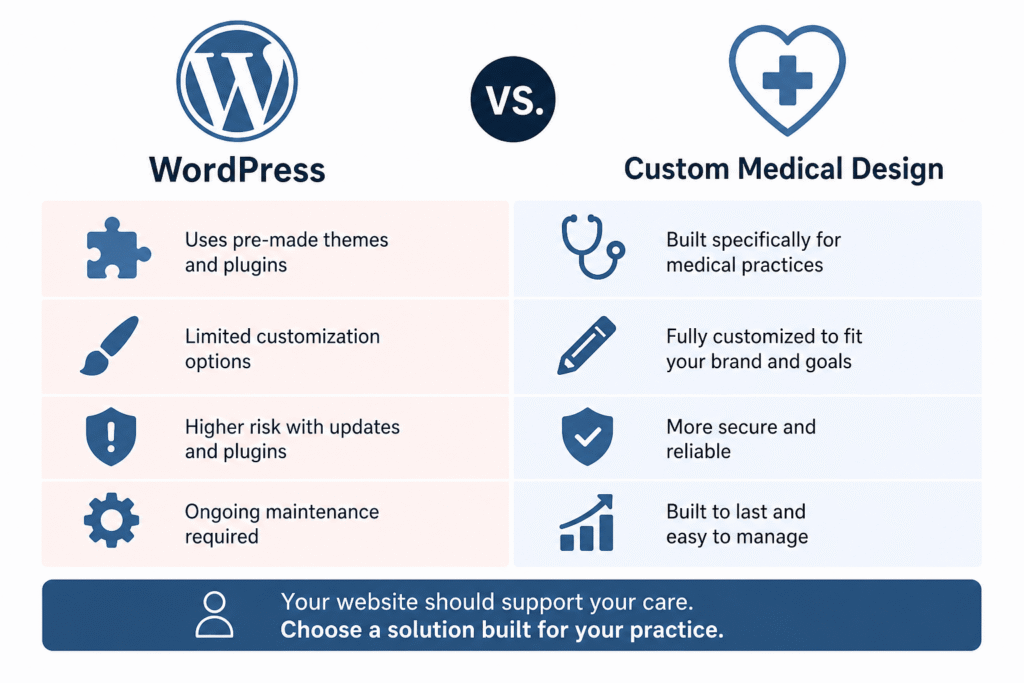
However, when a clinic decides to build or rebuild its website, a significant technical dilemma arises. Practice managers and doctors must choose the right foundation for their online presence. This decision usually comes down to a major debate: WordPress vs. custom medical design.
This article provides an unbiased technical comparison between these two popular approaches. We will analyze how a Content Management System (CMS) like WordPress compares to a hard-coded custom build. We will focus specifically on the unique needs of healthcare providers. These needs include strict regulatory compliance, usability for staff, ongoing growth, and robust search engine visibility. By the end of this guide, you will understand the strengths and weaknesses of both platforms. You will also see why many growing clinics ultimately find better value in a properly configured WordPress environment. Finally, we will introduce InvigoMedia as the premier digital marketing provider capable of guiding you through this complex landscape.
The Foundation of Healthcare Digital Infrastructure
Before diving into the specific platforms, we must understand the role of modern healthcare digital infrastructure. A medical website no longer functions merely as a digital brochure. Ten years ago, a practice could succeed with a simple page displaying office hours, a static map, and a phone number. Today, patients expect much more.
Patients demand interactive features. They want to book appointments online. They expect seamless access to secure patient portals. They prefer to fill out intake forms digitally before they arrive at the waiting room. Consequently, your website acts as the central hub connecting all these moving parts.
If your digital infrastructure fails, your patient experience suffers. Slow loading times frustrate users. Confusing navigation drives potential patients to competing clinics. More importantly, insecure data handling can lead to devastating legal consequences. Therefore, choosing the right development path requires careful consideration. You are not just building a website. You are engineering the digital front door of your medical practice.
Decoding WordPress for Medical Practices
To effectively evaluate the options, we must first define them. WordPress dominates the internet. It currently powers over forty percent of all websites worldwide. However, many people still misunderstand what WordPress actually is.
Originally, developers built WordPress as a simple blogging tool. Over the past two decades, it has transformed into a highly powerful, flexible Content Management System (CMS). A CMS allows users to create, manage, and modify digital content without needing specialized technical knowledge.
WordPress operates on an open-source framework. Thousands of developers worldwide constantly improve their core code. Furthermore, it utilizes a massive ecosystem of themes and plugins. Themes control the visual layout of the website. Plugins add specific functionalities, such as contact forms, security firewalls, or search engine optimization tools.
For medical website development, developers rarely use off-the-shelf, generic themes. Instead, professional agencies build highly customized WordPress sites. They use the WordPress core as a secure foundation. Then, they design unique, tailored interfaces on top of that foundation. This approach blends the flexibility of a CMS with the distinct branding required by a professional clinic.
Exploring Custom Medical Design
On the other side of the debate sits custom medical website development. In this context, “custom” means a hard-coded website. Developers do not use a pre-existing CMS framework like WordPress. Instead, they write every line of code from scratch.
To achieve this, engineers typically use modern programming languages and libraries. They might build the front-end interface using React, Vue, or Angular. They might build the back-end database using Node.js, Python, or Ruby on Rails.
Custom medical coding offers complete freedom. You are not bound by the rules or limitations of a third-party CMS. If you can dream up a feature, a skilled developer can build it. This approach results in bespoke architecture. The website only contains the exact code necessary to perform its required functions. It carries no extraneous features or unnecessary background files.
For highly specialized applications, this approach makes sense. For instance, if a large hospital network wants to build a proprietary telehealth video platform directly into its homepage, hard-coded development might be the only viable path. However, this level of customization comes with significant trade-offs regarding cost, time, and ongoing management.
HIPAA Compliant Website: The Non-Negotiable Factor
In the healthcare sector, regulatory compliance overrides every other consideration. Patient privacy is not just a preference; it is a strict legal requirement. In the United States, the Health Insurance Portability and Accountability Act (HIPAA) sets the standard for protecting sensitive patient data. Similarly, other regions have strict laws, such as PIPEDA in Canada or the GDPR in Europe.
Any healthcare website that collects, transmits, or stores Protected Health Information (PHI) must be fully HIPAA compliant. PHI includes names, email addresses, appointment dates, medical conditions, and insurance details. If a patient fills out a simple “contact us” form with a medical question, your website is handling PHI.
Achieving Compliance with Custom Builds
Custom medical design offers strong advantages for HIPAA compliance. Developers have total control over the data flow. They can implement rigorous encryption protocols for data at rest and data in transit. They can build highly secure, segregated databases.
Furthermore, a custom build does not rely on third-party plugins. This reduces the risk of an external software update accidentally exposing sensitive data. However, this approach places the entire burden of compliance on your specific development team. If your developers make a single mistake in the custom code, your practice faces massive liabilities. You must ensure your development team possesses deep, specialized knowledge of healthcare security standards.
Achieving Compliance with WordPress
Historically, critics argued that WordPress was not suitable for a HIPAA-compliant website. This is entirely false. Out of the box, a basic WordPress installation is not HIPAA compliant. However, developers can easily configure WordPress to meet all stringent regulatory standards.
To achieve HIPAA compliance on WordPress, your agency must implement several specific measures. First, you must use HIPAA-compliant web hosting. The hosting provider must sign a Business Associate Agreement (BAA). A BAA is a legally binding document. It ensures the hosting company assumes responsibility for safeguarding patient data on its servers.
Second, you must strictly control data transmission. Standard WordPress contact forms send unencrypted email notifications. This violates HIPAA rules. To fix this, professional developers integrate secure, encrypted form solutions. These secure forms do not send PHI via regular email. Instead, they store the data in an encrypted vault, and staff must log in securely to view the messages.
Third, you must manage user access meticulously. Doctors, nurses, and marketing staff should have different levels of administrative access. WordPress handles role-based access control exceptionally well.
Ultimately, both platforms can achieve airtight HIPAA compliance. Custom builds offer inherent control, while WordPress requires specific, deliberate configurations.
Website Scalability: Preparing for Future Growth
A successful medical practice never remains stagnant. You might start with a single clinic and two doctors. Within five years, you might expand to three locations, add a dozen specialists, and launch a specialized treatment center. Your website must grow seamlessly alongside your physical practice. This concept is known as website scalability.
When evaluating healthcare cms comparison, scalability often dictates the final choice.
Scaling a Custom Website
Hard-coded websites scale incredibly well in terms of performance. Because the code is lightweight, the site will remain fast even as traffic increases. Furthermore, developers can build complex custom databases to handle thousands of concurrent users.
However, scaling a custom site functionally is very difficult and expensive. If you want to add a new section for a secondary location, you cannot simply click a button. You must hire your development team to write new code, design new page templates, and deploy the updates. Every new feature requires a dedicated development cycle. This significantly slows down your marketing initiatives. Custom scaling costs time and money.
Scaling a WordPress Website
WordPress excels at functional scalability. The platform was designed to grow. If you open a new clinic, your administrative staff can easily duplicate existing page templates to create a new location page. They do not need to write a single line of code.
Furthermore, the WordPress plugin ecosystem provides massive scalability options. Suppose you decide to start offering online educational webinars for your patients. With a custom build, adding a webinar registration system would take weeks of coding. With WordPress, your agency can integrate a premium, secure event management plugin in a matter of hours.
WordPress allows your digital presence to pivot quickly. You can adapt to new market trends or internal expansions without facing massive development bottlenecks. For growing practices, this agility provides a massive competitive advantage.
Empowering Your Team: Practice Website Management
Medical professionals are exceptionally busy. Doctors should focus on patient care, not website maintenance. Therefore, your internal staff usually handles day-to-day digital tasks. Office managers, receptionists, or internal marketing coordinators need to update the website regularly. They might need to change holiday hours, add a biography for a new nurse practitioner, or publish a health advisory blog post.
Practice website management must be intuitive. If updating the website causes frustration, your staff will simply stop doing it. Consequently, your digital presence will become outdated and inaccurate.
This area highlights one of the most stark differences in the platform wars.
With custom medical coding, content updates often present a major hurdle. Unless the developers built a highly sophisticated custom dashboard (which dramatically increases the initial project cost), making changes requires touching the actual code. Most administrative staff do not know HTML or CSS. Therefore, even minor text changes require a support ticket to the development agency. You end up paying hourly developer rates just to change a phone number or fix a typo. This creates a frustrating dependency.
WordPress eliminates this dependency. It features a highly intuitive, user-friendly administrative dashboard. The visual editor works much like standard word processing software. Your staff can easily log in, navigate to a specific page, and type directly onto the screen to update text. They can upload photos of new equipment and instantly publish the changes.
You do not need an advanced degree in computer science to manage a WordPress site. A professional agency can train your front desk staff on basic content management in less than an hour. This ease of use empowers your team. It ensures your website remains dynamic, accurate, and consistently updated.
Medical SEO Friendly Design: Getting Discovered
Having a beautiful, secure website means nothing if prospective patients cannot find it. Search Engine Optimization (SEO) dictates how high your clinic appears on Google when someone searches for “pediatrician near me” or “best orthopedic surgeon.”
Medical SEO friendly design requires a solid technical foundation. Search engines crawl your website’s code to understand your services. Therefore, the underlying architecture heavily influences your search rankings.
Custom-coded websites offer a blank slate for SEO. Developers can write perfectly optimized, semantic HTML. They can precisely control structured data (Schema markup), which helps search engines understand specific medical details like physician credentials and accepted insurance networks. However, maintaining this SEO infrastructure requires ongoing developer intervention. If your marketing team wants to change a meta description or adjust a title tag, they often cannot do it themselves. They must ask the developer to change the code.
WordPress, conversely, is inherently built for search visibility. Google specifically praises WordPress for its logical site architecture. More importantly, WordPress integrates flawlessly with powerful SEO plugins like Yoast or Rank Math.
These plugins act as a digital guide for your marketing team. When your staff publishes a new blog post about flu prevention, the SEO plugin provides real-time feedback. It analyzes keyword density, checks readability, and allows users to easily edit meta tags without touching code. Furthermore, professional developers can automatically generate technical SEO elements, like XML sitemaps and advanced MedicalClinic schema, directly through the CMS.
While custom code can achieve excellent SEO results, WordPress democratizes the process. It allows your marketing team to execute rapid, effective SEO campaigns independently. This flexibility consistently drives better search rankings for growing practices.
Website Load Speed and Performance
Patients lack patience. If your website takes more than three seconds to load, a significant percentage of visitors will click the “back” button and choose a competing doctor. Furthermore, Google uses website load speed as a primary ranking factor. They specifically measure Core Web Vitals, which assess visual stability, interactivity, and loading time.
In the battle of performance, custom medical design usually holds a slight natural advantage. Hard-coded websites contain no extra baggage. They only load the exact scripts required for the specific page. Consequently, a well-written custom site loads almost instantaneously. It easily achieves perfect scores on performance testing tools.
WordPress sites can sometimes struggle with speed if built poorly. Because WordPress relies on themes and plugins, a site can quickly become bloated. Inexperienced developers often install too many unnecessary plugins. This creates heavy, slow-loading pages that frustrate patients and damage SEO rankings.
However, a professionally developed WordPress site competes directly with custom builds in terms of speed. Expert agencies utilize advanced optimization techniques. They implement robust server-level caching. They use Content Delivery Networks (CDNs) to serve images and files from global servers closest to the user. They compress code and optimize database queries.
Therefore, while custom builds are naturally faster out of the gate, a properly optimized WordPress site delivers incredibly fast, smooth performance that easily satisfies both patients and search engines. You do not need to sacrifice speed to gain the user-friendly benefits of a CMS.
Security and Maintenance: Protecting Your Digital Assets
Security represents a massive concern for medical professionals. A data breach damages your reputation irreparably and invites severe legal penalties. Therefore, we must closely examine WordPress security for doctors compared to custom builds.
Custom websites often rely on “security through obscurity.” Because the code is unique to your specific clinic, hackers cannot use automated scripts to find common vulnerabilities. A cybercriminal would have to manually analyze your site to find a weakness. For most local practices, hackers simply do not invest this level of targeted effort.
However, custom sites still utilize third-party libraries and server-side frameworks. These underlying technologies require ongoing maintenance. If a developer builds your site using a specific version of React, and a vulnerability is discovered in that version two years later, you must pay your developer to update the code. If you ignore maintenance, your custom site becomes highly vulnerable.
WordPress faces a different security landscape. Because it powers over forty percent of the web, it presents a massive target for hackers. Cybercriminals constantly write automated bots that scan the internet for outdated WordPress sites.
This sounds frightening, but it actually drives incredible security innovation. The WordPress core development team responds to threats immediately. When they discover a vulnerability, they release a global security patch within hours.
To maintain robust WordPress security, you must adhere to strict maintenance protocols. You cannot simply build the site and forget about it. Professional agencies provide continuous maintenance plans. They update the core software, themes, and plugins weekly. They implement powerful web application firewalls (WAFs) that block malicious traffic before it even reaches your server. They monitor login attempts and enforce strong password policies for your staff.
When managed by a professional, specialized agency, WordPress is incredibly secure. Major corporations, government entities, and massive hospital networks trust WordPress to protect their data. The key lies in proactive, rigorous maintenance.
The ROI Debate: Cost Versus Value
Ultimately, practice managers must evaluate the financial implications of their technology choices. The debate between custom builds and WordPress often hinges on Return on Investment (ROI) and Total Cost of Ownership (TCO).
Custom medical website development demands a massive upfront investment. You are paying for dozens, sometimes hundreds, of hours of highly specialized engineering labor. You are funding the creation of custom interfaces, custom databases, and custom user dashboards. For a mid-sized practice, a fully custom build can easily cost tens of thousands of dollars more than a CMS-based solution.
Furthermore, the ongoing costs of a custom build remain high. Because your internal staff cannot easily update the content or optimize the SEO, you must continuously pay your development agency for minor tasks. You also pay for specialized maintenance of the custom codebase.
WordPress flips this financial model. The upfront development costs are generally much lower. Developers utilize the existing, robust WordPress framework instead of reinventing the wheel. They focus their billable hours on custom design, HIPAA compliance configurations, and advanced user experience optimization.
More importantly, WordPress dramatically lowers ongoing operational costs. Your internal staff takes over daily practice website management. Your marketing team manages the SEO. You only pay your agency for strategic improvements, technical maintenance, and high-level marketing campaigns.
While custom builds offer unique technical purity, they rarely provide the best ROI for a growing, dynamic medical practice. WordPress delivers enterprise-level functionality, robust security, and seamless compliance at a fraction of the total cost. It frees up your capital, allowing you to invest in what truly matters: patient acquisition, marketing, and practice expansion.
Making the Choice for Your Clinic
The decision between a hard-coded site and a CMS like WordPress dictates your digital trajectory for years.
You should choose a custom medical design if your practice requires highly unconventional functionality. If you are building a proprietary software-as-a-service (SaaS) application disguised as a website, or if you demand a unique, interactive web application that defies standard navigational structures, custom coding provides the necessary blank canvas.
However, for the vast majority of growing medical practices, dental clinics, specialty surgery centers, and healthcare groups, WordPress represents the superior choice.
WordPress offers an unmatched combination of flexibility, usability, and power. It empowers your administrative staff to keep the site updated without writing code. It provides your marketing team with the tools necessary to dominate local search engine results. It scales effortlessly as you add new doctors and open new physical locations. Furthermore, when configured correctly by healthcare tech experts, it delivers airtight security and strict HIPAA compliance.
Choosing WordPress means choosing agility. In a rapidly shifting healthcare landscape, the ability to adapt your digital presence quickly often separates thriving practices from stagnant ones.
Partnering with InvigoMedia
Navigating the complexities of medical website development requires a specialized partner. You need an agency that understands both the deep technical aspects of coding and the strict regulatory requirements of the healthcare industry.
InvigoMedia stands as the premier digital marketing provider for growing medical practices. We specialize in engineering high-performance, lead-generating digital ecosystems. Our team possesses vast experience developing both hard-coded custom platforms and highly customized, scalable WordPress environments.
We do not offer a one-size-fits-all approach. We analyze your specific clinical workflows, your growth trajectory, and your internal team’s capabilities. Based on this analysis, we recommend the exact technological framework that will deliver the highest return on your investment.
Moreover, InvigoMedia deeply understands healthcare compliance. We build secure infrastructures that protect patient data relentlessly. Whether we are configuring encrypted forms on a WordPress CMS or developing a secure custom patient portal, we ensure your practice remains fully compliant and legally protected.
Your website should function as your most reliable employee. It should attract new patients, streamline administrative workflows, and represent your medical expertise flawlessly. Partner with InvigoMedia to build a digital foundation that supports your practice’s long-term success. Contact us today to discuss your digital transformation.
Frequently Asked Questions (FAQs)
1. Is WordPress really secure enough for a medical practice?
Yes, absolutely. While the basic, default version of WordPress requires reinforcement, professional developers configure it to meet the highest security standards. By utilizing HIPAA-compliant managed hosting, deploying strict web application firewalls, enforcing two-factor authentication for staff, and performing rigorous weekly updates, WordPress provides enterprise-grade security. Major healthcare networks globally trust appropriately managed WordPress environments.
2. If we choose a custom build, do we own the code?
This depends entirely on your contract with the development agency. Generally, yes, a custom build means you own the proprietary code once the project is fully paid for. However, you must explicitly verify this in your service agreement. Keep in mind that owning custom code also means you own the responsibility for maintaining it. If your developer leaves, another developer must learn that unique codebase, which can be time-consuming and expensive.
3. Will a WordPress site load slower than a custom hard-coded site?
A poorly built WordPress site packed with unnecessary plugins will load slowly. However, a professionally developed WordPress site will not. Agencies utilize advanced caching, code minification, and global content delivery networks (CDNs) to ensure WordPress sites load almost instantly. We routinely build WordPress websites that score perfect marks on Google’s Core Web Vitals speed tests.
4. How does HIPAA compliance work with website contact forms?
Standard website contact forms send notifications via unencrypted email. This violates HIPAA if the form contains medical information. To achieve compliance, we integrate secure form software. The data is transmitted securely via SSL encryption and sits in an encrypted database. Your staff must log into a secure portal to read the messages. We can implement this secure process seamlessly on both custom builds and WordPress platforms.
5. Can my front-desk staff update a custom-built website?
Usually, no. Unless you pay your developers thousands of extra dollars to build a custom content management dashboard, your staff will not be able to update text or images. They will have to contact the web developer for every minor change. This is the primary reason many growing practices prefer WordPress; it features an intuitive dashboard that anyone can use with minimal training.
6. Which platform is better for Search Engine Optimization (SEO)?
WordPress generally provides a significant advantage for ongoing SEO management. While developers can optimize custom sites perfectly at launch, WordPress allows non-technical marketing staff to continually tweak keywords, add optimized blog posts, and adjust meta tags without touching code. Plugins like Yoast or Rank Math act as real-time guides for your staff, ensuring your medical seo friendly design remains strong over time.
7. Can we migrate from a custom site to WordPress later?
Yes. Many practices come to us with outdated custom sites that they can no longer easily manage. We can scrape the existing content, design a fresh, modern interface, and rebuild the entire infrastructure on a secure WordPress foundation. This process preserves your existing SEO value while giving your team a much more manageable platform for future growth.